Zapier AI Automation for Teams: Governance and Production Workflows
Make Zapier AI automation production ready for teams. Map structured outputs, enforce governance, add human review, plus when to hire help.
On this page
Zapier lets teams add AI steps and agentic actions to Zaps, so a workflow can read, decide, and act across thousands of connected apps instead of just moving data between them. It suits sales teams scoring leads, support teams triaging tickets, and operations teams generating reports from meeting transcripts. The fastest way in is building a single AI action step or connecting a Model Context Protocol (MCP) server to a tool you already use.
TL;DR:
- Most failures in AI workflows stem from mapping errors and poor schema design, not prompt quality, making structured output fields and access controls essential.
- Separating model selection from app connections with MCP and AI by Zapier provides portability, allowing teams to swap models without rebuilding workflows.
- Prioritize building a solid foundation with clear instructions, defined output schemas, and rollback plans before tuning prompts for reliable production use.
- Use human review checkpoints and filters, especially for workflows involving customer data or financial records, to prevent silent errors and maintain governance.
- Engage external consultants when workflows involve sensitive data, span multiple systems, or lack documentation, to ensure maintainability and proper oversight.
What Are Zapier’s AI Features?
Zapier has split AI capability into three distinct product surfaces, and confusing them is the most common mistake teams make early on.
AI by Zapier is the umbrella product for adding AI directly into a Zap. Inside it, you choose between an AI action step, which takes an instruction and produces structured output for the next step in your Zap, or an agentic configuration, where the AI reasons over multiple possible paths and decides which app actions to call at runtime rather than following one fixed sequence.
Zapier MCP is different in kind, not just in name. Instead of living inside a single Zap, MCP exposes your connected apps as tools that an external AI client (a chatbot, a custom agent, an internal assistant) can call directly. It connects AI clients to more than 9,000 app integrations, governed by workspace-level access controls and backed by SOC 2 Type II certification. Think of AI by Zapier as AI embedded in your automation, and MCP as your automation exposed to someone else’s AI.
Both surfaces share a few practical mechanics worth knowing before you build anything:
- Model tier selection. You pick which underlying model powers a given AI step, and Zapier’s positioning as a portability layer means you can often swap models later without rebuilding the surrounding Zap.
- Bring-your-own-model (BYOM) options for teams with existing model contracts or compliance requirements around specific providers.
- Output fields. AI steps return structured fields, not just raw text, which is what makes mapping into a CRM update, a Slack message, or a database write reliable instead of guesswork.
- Preview regeneration, letting you rerun a prompt against sample data before committing the step to production.
How Do You Build an AI-Powered Zap?
Building a reliable AI-powered Zap is less about the AI step itself and more about the plumbing around it. Here’s the sequence that holds up in practice.
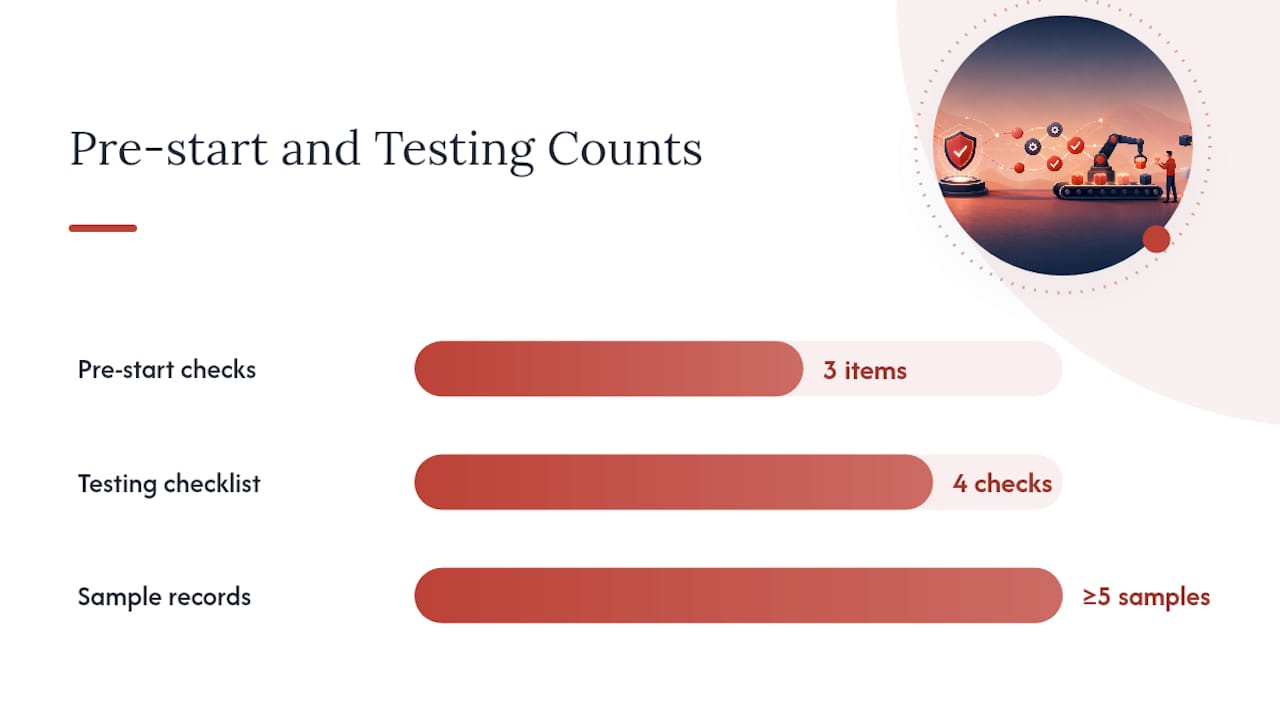
Before you start, confirm three things: you have admin or edit access to the relevant app connections, your team’s identity controls (SSO, role permissions) are configured at the workspace level, and you have a realistic sample of the data the Zap will process, not a hypothetical example.
- Choose your trigger. Pick the event that should kick off the workflow, a new form submission, a new CRM deal stage, an incoming support ticket. Vague triggers (“new email”) produce noisy Zaps; scope the trigger with filters up front.
- Add the AI action step. Select AI by Zapier and choose agentic or non-agentic mode depending on whether the task needs multi-path decision-making or a single structured output.
- Configure the model and instructions. Pick a model tier, write your instruction, and define the output schema you expect back.
- Map output fields into downstream actions. Connect each returned field, lead score, summary text, category label, into the specific input of your next step (a CRM update, a Slack post, a task creation).
- Add filters and paths. Route low confidence outputs to a human review queue instead of letting them flow straight through.
- Test with real data. Run the Zap against several historical records, not just one clean example, and use preview regeneration to catch prompt weaknesses before deployment.
Testing checklist: regenerate the preview against at least five sample records, confirm output fields map correctly with no null values, verify the rollback plan (a way to pause the Zap without losing data), and check that filtered/rejected records land somewhere visible, not silently dropped.
Pro Tip: Run your AI step against your ugliest data first, not your cleanest. A prompt that survives a sloppy support ticket or a half-filled form will survive everything else you throw at it.
Once live, watch your run history for quota consumption and rate limit warnings. Zapier’s infrastructure handles retries automatically using your existing OAuth connections, which reduces the operational overhead of building your own retry logic.
How Do You Keep AI Actions Secure and Auditable?
Governance is not optional once an AI step can write to your CRM or send a customer-facing message on its own. Zapier builds several controls into the workspace layer specifically for this.
- Workspace-level access controls determine who can create, edit, or publish Zaps that include AI steps, separate from who can simply view them.
- Managed connections and role-based permissions let you delegate Zap building to non-admin team members while keeping sensitive app connections locked to a smaller group.
- Action-level and domain restrictions limit which specific actions an AI step can call, which matters most in agentic configurations where the AI is choosing between multiple possible actions at runtime.
- Audit trails and run history log every execution, which output was generated, which fields were mapped, and what downstream action fired, giving you a record to review when something goes wrong.
- SOC 2 Type II certification covers the underlying MCP infrastructure, which matters for teams in regulated industries evaluating whether to expose internal data to an AI client.
For rollout, treat new AI Zaps like you would a code deployment: pilot in a sandbox app or a low-stakes channel, watch the audit trail for a week, then expand access. Guided templates and role-based access exist specifically so teams can start safely and enforce guardrails as they scale, rather than opening AI actions to the whole workspace on day one.
What Are Real Business Use Cases for This?
The value of Zapier AI automation shows up fastest in workflows that involve judgment calls a rules-based Zap can’t make on its own.
- Lead qualification. An AI action reads a new form submission, scores it against your ideal customer profile, and writes the score directly into HubSpot or Salesforce, so reps see priority before they open the record.
- Support triage. Incoming tickets get classified by urgency and topic, a draft response is generated, and a human agent reviews before sending, which keeps AI in an assist role rather than a fully autonomous one.
- Deal intelligence. A call transcript gets parsed into structured fields, next steps, objections raised, budget mentioned, which populate CRM fields automatically instead of requiring a rep to type notes after every call.
- Internal operations. Meeting transcripts become summaries, weekly reports get generated from scattered spreadsheet data, and customer records get enriched with public company information before an outreach sequence starts.
Zapier’s own documentation lists similar patterns: summarizing a Slack channel, adding a calendar event from an email, or updating CRM records directly through an MCP-connected AI client rather than a dedicated Zap.
What Makes AI Automations Reliable in Production?
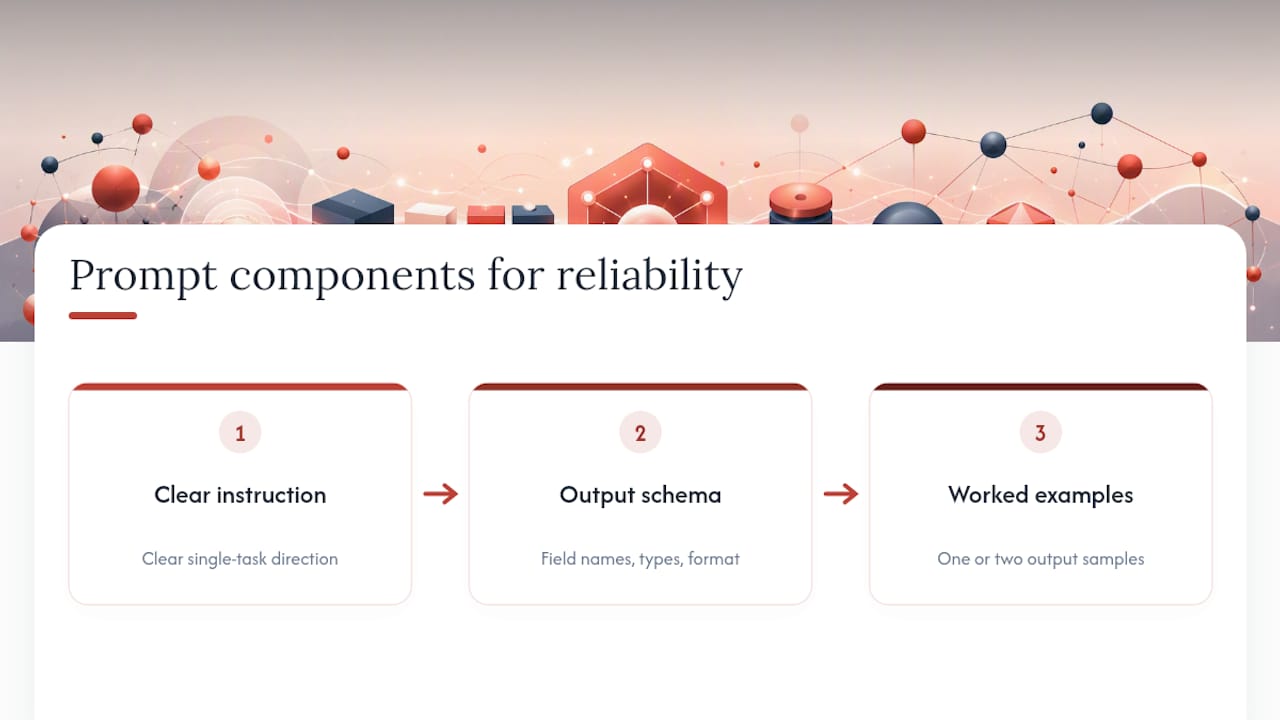
Most AI Zap failures trace back to vague prompts, not model limitations. A stable prompt needs three components: a clear instruction, an explicit output schema (field names, types, expected format), and one or two worked examples showing the exact output you want. Skipping the schema is the single most common cause of downstream mapping errors.
Build a human checkpoint into any step that writes to a customer-facing system or changes a financial record. Agentic steps that combine rules-based paths with AI reasoning make runtime decisions, which is exactly where a review gate matters most before something ships automatically.
Watch token usage on high-volume Zaps by chunking large inputs and paginating results rather than sending everything in one call. Sample your outputs weekly, not just when something breaks, and set alerts on failed runs so a silent failure doesn’t run unnoticed for a month.
Pro Tip: Zapier’s own guidance recommends iterative prompt tuning with structured output fields rather than trying to write the perfect prompt on the first attempt. Treat your first version as a draft, not a deployment.
Should You Build This Yourself or Bring in Help?
Most teams can build a single AI action step without outside help. The signals that you need more than a weekend project usually show up once the workflow touches sensitive data, spans more than two or three systems, or lacks any real governance layer around who can edit it.
Watch for these three signs specifically: customer or financial data flowing through an AI step with no access review, an agentic Zap making decisions across systems that no one has mapped end to end, or a workflow that only one person on the team understands well enough to fix when it breaks.
An embedded AI engagement typically starts with an audit of existing workflows, moves into implementation inside the tools a team already owns, and ends with documented handover, not a system that depends on an outside agency to maintain.
That last part is the one most DIY builds skip, and it’s usually what breaks six months later. Readers building this internally can find implementation notes on the Theodoros Ampas blog.
Where the Conventional Advice Gets This Wrong
Most guides treat Zapier AI automation as a template problem: pick the right prompt, copy the right Zap, and you’re done. That undersells what actually breaks these workflows in production. The failures I’d expect to matter most aren’t prompt quality, they’re mapping errors between AI output and downstream fields, and governance gaps that nobody notices until an AI step writes something wrong to a live customer record.
The overrated skill here is prompt engineering. The underrated skill is designing the schema and the human checkpoint around the AI step, because that’s what determines whether an error stays contained or cascades through your CRM. If you’re new to this, prioritize the boring plumbing first: output field mapping, access controls, and a rollback plan. Get that right before you spend another hour tuning wording.
Where Zapier genuinely earns its category leadership is portability. Because MCP and AI by Zapier separate the model from the app connections, you’re not locked into one provider’s ecosystem the way you would be building custom integrations from scratch. That’s worth more than most teams realize until they need to swap models.
Theodor
Get Hands-On Help Implementing Zapier AI Automation
If the governance section above made you realize your team has more automation ambition than automation oversight, that’s exactly the gap embedded AI consulting closes. Theodorosampas offers consulting services that involve auditing how sales, marketing, and operations workflows actually run before building AI systems.
Engagements usually start with a workflow audit, move into implementation inside existing systems, and include documentation plus handover so the team can own and understand the system after completion. This isn’t a permanent dependency on an outside agency. It’s built so your team can run and adjust the workflows without calling anyone. If you’re weighing whether to build an AI-powered Zap internally or bring in structured help, start with the embedded AI services page to see what an audit covers, or visit Theodorosampas to get in touch directly.
Where to Check the Details While You Build
- Zapier MCP documentation for setup details, access controls, and SOC 2 scope.
- AI by Zapier guide for model tiers, output field mapping, and prompt iteration.
- AI quick-start guide in Zapier’s help center for templates, the AI-assisted Zap builder, and Formatter with AI examples.
FAQ
What Is Zapier AI Used For?
Zapier AI is used to add decision-making and content generation into automated workflows, scoring leads, classifying support tickets, summarizing calls, and writing structured data into CRMs and other business apps without manual entry.
Is Zapier AI Free to Use?
Zapier’s core AI action steps are available on paid plans with usage limits tied to your subscription tier, and pricing depends on the plan level and task volume; check Zapier’s current plan pages for exact limits since these change periodically.
Is Zapier an AI Automation Platform?
Zapier is fundamentally a workflow automation platform that has added AI capability through AI by Zapier and MCP, letting AI models trigger actions across more than 9,000 connected apps rather than functioning as a standalone AI model provider.
How Much Does Zapier AI Cost per Month?
Cost varies by plan tier and the volume of AI tasks run each month, since AI actions typically draw from the same task or credit allowance as the rest of your Zapier plan; there’s no single flat monthly AI fee published across all plans.
When Should I Hire Help Instead of Building This Myself?
Bring in outside help when an AI step touches sensitive customer data, spans multiple systems with no clear owner, or when no one on the team can explain how the workflow makes its decisions, all signs a structured audit and documented build will save more time than a DIY attempt.